- Oct 07 Tue 2008 15:14
-
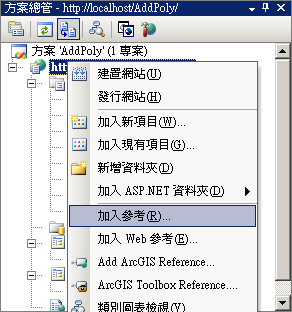
C# 引用別人做好的DLL
- Sep 23 Tue 2008 10:27
-
[CSS] 圖片連結去連結線
早上呆頭了下...怎麼加入圖片連結那個連結線弄不掉
圖片連結有框沒框對照

還以為加了下面幾行css會奏效
<!--
a:link {
text-decoration: none;
}
a:visited {
text-decoration: none;
}
a:active {
text-decoration: none;
}
-->
結果也是失敗(指IE7.0,沒試其它瀏覽器)
其實要弄掉很簡單,img標籤設border屬性為0就行了,冏
<img src="pic.jpg" border="0">
圖片連結有框沒框對照

還以為加了下面幾行css會奏效
<!--
a:link {
text-decoration: none;
}
a:visited {
text-decoration: none;
}
a:active {
text-decoration: none;
}
-->
結果也是失敗(指IE7.0,沒試其它瀏覽器)
其實要弄掉很簡單,img標籤設border屬性為0就行了,冏
<img src="pic.jpg" border="0">
- Sep 19 Fri 2008 09:21
-
[CSS] 使整個網頁置中
html, body { margin: 0; text-align: center; }
#container {
position: relative;
margin: 0 auto;
width: 760px;
text-align: left;
}或者是用負邊界置中的trick
#wrap {
width: 容器寬度;
position: relative;
left: 50%;
margin-left: -容器寬度/2}html, body { margin: 0; }
#container {
width: 780px;
position: relative;
left: 50%;
margin-left: -390px;
}
如果在IE沒正常顯示時,先檢查一下DOCTYPE這個標籤有沒有正常設定
#container {
position: relative;
margin: 0 auto;
width: 760px;
text-align: left;
}或者是用負邊界置中的trick
#wrap {
width: 容器寬度;
position: relative;
left: 50%;
margin-left: -容器寬度/2}html, body { margin: 0; }
#container {
width: 780px;
position: relative;
left: 50%;
margin-left: -390px;
}
如果在IE沒正常顯示時,先檢查一下DOCTYPE這個標籤有沒有正常設定
- Sep 09 Tue 2008 11:25
-
[MFC] Memory Leak Detection
- Sep 09 Tue 2008 08:51
-
[暫存] gdi solution
GDI+ ColorMatrix
GetDIBits
GetPixel
GetDeviceCaps
Graphics.CopyFromScreen
參考來源
HBITMAP CopyScreenToBitmap(LPRECT lpRect) //lpRect 代表选定区域
{
HDC hScrDC, hMemDC; // 屏幕和内存设备描述表
HBITMAP hBitmap, hOldBitmap; // 位图句柄
int nX, nY, nX2, nY2; // 选定区域坐标
int nWidth, nHeight; // 位图宽度和高度
int xScrn, yScrn; // 屏幕分辨率
// 确保选定区域不为空矩形
if (IsRectEmpty(lpRect))
return NULL;
//为屏幕创建设备描述表
hScrDC = CreateDC("DISPLAY", NULL, NULL, NULL);
//为屏幕设备描述表创建兼容的内存设备描述表
hMemDC = CreateCompatibleDC(hScrDC);
// 获得选定区域坐标
nX = lpRect- >left;
nY = lpRect- >top;
nX2 = lpRect- >right;
nY2 = lpRect- >bottom;
// 获得屏幕分辨率
xScrn = GetDeviceCaps(hScrDC, HORZRES);
yScrn = GetDeviceCaps(hScrDC, VERTRES);
//确保选定区域是可见的
if (nX < 0) nX = 0; if (nY < 0) nY = 0; if (nX2 > xScrn)
nX2 = xScrn;
if (nY2 > yScrn)
nY2 = yScrn;
nWidth = nX2 - nX;
nHeight = nY2 - nY;
// 创建一个与屏幕设备描述表兼容的位图
hBitmap = CreateCompatibleBitmap(hScrDC, nWidth, nHeight);
// 把新位图选到内存设备描述表中
hOldBitmap = SelectObject(hMemDC, hBitmap);
// 把屏幕设备描述表拷贝到内存设备描述表中
BitBlt(hMemDC, 0, 0, nWidth, nHeight, hScrDC, nX, nY, SRCCOPY);
//得到屏幕位图的句柄
hBitmap = SelectObject(hMemDC, hOldBitmap);
//清除
DeleteDC(hScrDC);
DeleteDC(hMemDC);
// 返回位图句柄
return hBitmap;
GetDIBits
GetPixel
GetDeviceCaps
Graphics.CopyFromScreen
參考來源
HBITMAP CopyScreenToBitmap(LPRECT lpRect) //lpRect 代表选定区域
{
HDC hScrDC, hMemDC; // 屏幕和内存设备描述表
HBITMAP hBitmap, hOldBitmap; // 位图句柄
int nX, nY, nX2, nY2; // 选定区域坐标
int nWidth, nHeight; // 位图宽度和高度
int xScrn, yScrn; // 屏幕分辨率
// 确保选定区域不为空矩形
if (IsRectEmpty(lpRect))
return NULL;
//为屏幕创建设备描述表
hScrDC = CreateDC("DISPLAY", NULL, NULL, NULL);
//为屏幕设备描述表创建兼容的内存设备描述表
hMemDC = CreateCompatibleDC(hScrDC);
// 获得选定区域坐标
nX = lpRect- >left;
nY = lpRect- >top;
nX2 = lpRect- >right;
nY2 = lpRect- >bottom;
// 获得屏幕分辨率
xScrn = GetDeviceCaps(hScrDC, HORZRES);
yScrn = GetDeviceCaps(hScrDC, VERTRES);
//确保选定区域是可见的
if (nX < 0) nX = 0; if (nY < 0) nY = 0; if (nX2 > xScrn)
nX2 = xScrn;
if (nY2 > yScrn)
nY2 = yScrn;
nWidth = nX2 - nX;
nHeight = nY2 - nY;
// 创建一个与屏幕设备描述表兼容的位图
hBitmap = CreateCompatibleBitmap(hScrDC, nWidth, nHeight);
// 把新位图选到内存设备描述表中
hOldBitmap = SelectObject(hMemDC, hBitmap);
// 把屏幕设备描述表拷贝到内存设备描述表中
BitBlt(hMemDC, 0, 0, nWidth, nHeight, hScrDC, nX, nY, SRCCOPY);
//得到屏幕位图的句柄
hBitmap = SelectObject(hMemDC, hOldBitmap);
//清除
DeleteDC(hScrDC);
DeleteDC(hMemDC);
// 返回位图句柄
return hBitmap;
- Sep 08 Mon 2008 09:45
-
Windows 2003 使用 AjaxControlToolkit 網頁還是會postback
解決方法...
試試在web.config加入下面內容
<compilation debug="false">
<assemblies>
<add assembly="System.Web.Extensions, Version=1.0.61025.0, Culture=neutral, PublicKeyToken=31bf3856ad364e35"/>
</assemblies>
</compilation>
<httpHandlers>
<remove verb="*" path="*.asmx"/>
<add verb="*" path="*.asmx" validate="false" type="System.Web.Script.Services.ScriptHandlerFactory, System.Web.Extensions, Version=1.0.61025.0, Culture=neutral, PublicKeyToken=31bf3856ad364e35"/>
<add verb="*" path="*_AppService.axd" validate="false" type="System.Web.Script.Services.ScriptHandlerFactory, System.Web.Extensions, Version=1.0.61025.0, Culture=neutral, PublicKeyToken=31bf3856ad364e35"/>
<add verb="GET,HEAD" path="ScriptResource.axd" type="System.Web.Handlers.ScriptResourceHandler, System.Web.Extensions, Version=1.0.61025.0, Culture=neutral, PublicKeyToken=31bf3856ad364e35" validate="false"/>
</httpHandlers>
<httpModules>
<add name="ScriptModule" type="System.Web.Handlers.ScriptModule, System.Web.Extensions, Version=1.0.61025.0, Culture=neutral, PublicKeyToken=31bf3856ad364e35"/>
</httpModules>
http://forums.microsoft.com/msdn-cht/ShowPost.aspx?PostID=1323790&SiteID=14
試試在web.config加入下面內容
<compilation debug="false">
<assemblies>
<add assembly="System.Web.Extensions, Version=1.0.61025.0, Culture=neutral, PublicKeyToken=31bf3856ad364e35"/>
</assemblies>
</compilation>
<httpHandlers>
<remove verb="*" path="*.asmx"/>
<add verb="*" path="*.asmx" validate="false" type="System.Web.Script.Services.ScriptHandlerFactory, System.Web.Extensions, Version=1.0.61025.0, Culture=neutral, PublicKeyToken=31bf3856ad364e35"/>
<add verb="*" path="*_AppService.axd" validate="false" type="System.Web.Script.Services.ScriptHandlerFactory, System.Web.Extensions, Version=1.0.61025.0, Culture=neutral, PublicKeyToken=31bf3856ad364e35"/>
<add verb="GET,HEAD" path="ScriptResource.axd" type="System.Web.Handlers.ScriptResourceHandler, System.Web.Extensions, Version=1.0.61025.0, Culture=neutral, PublicKeyToken=31bf3856ad364e35" validate="false"/>
</httpHandlers>
<httpModules>
<add name="ScriptModule" type="System.Web.Handlers.ScriptModule, System.Web.Extensions, Version=1.0.61025.0, Culture=neutral, PublicKeyToken=31bf3856ad364e35"/>
</httpModules>
http://forums.microsoft.com/msdn-cht/ShowPost.aspx?PostID=1323790&SiteID=14
- Sep 07 Sun 2008 20:23
-
[javascript] window.open 出現[object]
一般在.asp或.aspx網頁上加入一個HyperLink
並且設定NavigateUrl為"javascript:window.open('網址')"
在IE,FF都會開新視窗,但本身視窗(opener)會出現[object]or[object Window]的訊息
要解決這個問題,只要在多一個"void",如下所示,就可以解決了~
"javascript:void window.open('網址')"
- Sep 07 Sun 2008 19:57
-
[javascript] insertAdjacentHTML 點用?
insertAdjacentHTML("插入位置參數","欲插入的element") 待續。
- Sep 07 Sun 2008 12:59
-
[CSS] style.display 和 style.visibility的差別
visibility屬性用來確定元素是顯示還是隱藏的,這用visibility="visible|hidden"來表示(visible表示顯示,hidden表示隱藏)。
當visibility被設置為"hidden"的時候,元素雖然被隱藏了,但它仍然佔據它原來所在的位置。
http://220.135.241.51/blog/article.asp?id=2221
待續。
當visibility被設置為"hidden"的時候,元素雖然被隱藏了,但它仍然佔據它原來所在的位置。
http://220.135.241.51/blog/article.asp?id=2221
待續。
- Sep 06 Sat 2008 21:30
-
[javascript] use insertBefore insert element
我的結構大概長這樣
<td id=tdCity>
  radio1<input type=radio name="chosen">
  radio2<input type="radio" name="chosen">
  <select name="city" id="city"></select>
  <select name="town"></select>
</td>
照理說city dropdownlist的parentNode就是tdCity
<script>
  var Insertpos = document.getElementById("tdCity");
  var refChild = document.getElementsByName("city");
  refChild.parentNode.insertBefore(newNode,refChild);
  //Insertpos.insertBefore(newNode,refChild); (效果同上)
</script>
但是,照著上面這樣寫會出現parentNode是null的錯誤訊息
後來把 var refChild = document.getElementsByName("city");
改成 var refChild = document.getElementById("city");
就ok了,做個記錄。
參考資料:
JavaScript之appendChild VS insertBefore
JavaScript:createElement
javascript---使用createElement动态创建HTML对象
- Sep 03 Wed 2008 16:46
-
js視窗操作
如果你今天透過非 window.open的方式(也就是透過使用者執行desktop application)打開一個browser視窗,而且你的網頁中要執行javascript的window.close(),則browser會問使用者是不是真的要把這個視窗給關閉。之所以有這一層的防護是因為安全的理由(避免一個browser window無聲無息的就關閉了)。如果該視窗是透過javascript的window.open打開的,那麼就不會有這個對話框。
EX:<a href="#" onClick="window.open('abc.aspx?no=123','_new' ,'height=300,width=800,toolbar=no,status=yes,resizable=yes,scrollbars=yes');window.close();">test</a>";
OR:<a href="javascript:void window.open('abc.aspx?no=123','_new' ,'height=300,width=800,toolbar=no,status=yes,resizable=yes,scrollbars=yes');">連結</a>";
EX:<a href="#" onClick="window.open('abc.aspx?no=123','_new' ,'height=300,width=800,toolbar=no,status=yes,resizable=yes,scrollbars=yes');window.close();">test</a>";
OR:<a href="javascript:void window.open('abc.aspx?no=123','_new' ,'height=300,width=800,toolbar=no,status=yes,resizable=yes,scrollbars=yes');">連結</a>";
- Aug 19 Tue 2008 17:29
-
CMD下,XP重新開機指令
關機
SHUTDOWN /s /t:05
重新開機
SHUTDOWN /r /t:05
其中 /t 後面的數字代表延遲幾秒,範例中代表 5 秒後關機或重新開機
您也可以開啟命令提示列,輸入 SHUTDOWN /? 就可以找到相關的參數說明
或參考 Microsoft KB317371
也可以用工作管理員重新開機
若不是系統管理帳號必須把該帳號新增到Power Users群組
